

Download Universal Document Converter – document conversion, PDF, image, AutoCAD, combine documents, file format, utility, tool
Overview
Universal Document Converter is a productivity-focused utility designed to streamline the process of transforming various file types into standardized image and document formats. The application serves as a centralized solution for users who frequently need to convert files for sharing, archiving, or presentation purposes. It addresses the common challenge of managing multiple conversion tools by offering a single, integrated platform that supports a wide range of input and output formats. The app is particularly useful for professionals in design, engineering, and administrative fields who work with complex file types such as AutoCAD drawings, Word documents, and spreadsheets.
Target users include office workers, graphic designers, architects, and technical staff who require reliable, consistent output without the need for specialized software. The developer, SoftPas, has positioned the tool as a secure and efficient alternative to fragmented conversion workflows. Real-world use cases include preparing project documentation for client review, converting legacy files into modern formats, and consolidating reports into unified PDFs. In the broader app ecosystem, Universal Document Converter fills a niche for lightweight yet powerful file conversion tools, especially within the Windows environment. Its focus on compatibility with professional file types underscores its relevance in technical and business workflows.
Key Features & Functionality
- Professional File Format Conversion – The app enables conversion of diverse file types, including AutoCAD files, into widely supported formats such as PDF, JPEG, TIFF, and PNG. This capability is ideal for sharing technical drawings or design plans without requiring recipients to have the original software.
- Document Combination – Users can merge multiple documents into a single output file, streamlining the creation of comprehensive reports, portfolios, or project summaries. This feature reduces clutter and enhances file management efficiency.
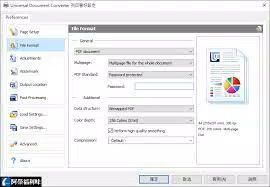
- Support for Eight Output Formats – The application exports files to PDF, JPEG, TIFF, PNG, GIF, PCX, DCX, and BMP, offering flexibility for different use cases, from web publishing to archival storage.
- Comprehensive Tutorials – Built-in step-by-step guides help users navigate both basic and advanced functions, reducing the learning curve and promoting effective tool utilization.
- Integrated Workflow – By eliminating the need to install multiple conversion utilities, Universal Document Converter simplifies the user’s digital workspace and reduces system resource consumption.
For example, an architect can convert a series of AutoCAD blueprints into a single PDF for client presentation, while an office administrator may combine quarterly reports into one consolidated file for internal distribution. These practical applications highlight the app’s value in real-world professional environments.
Interface, UX & Performance
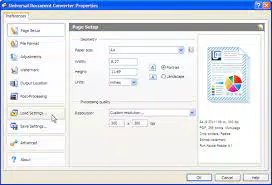
The user interface of Universal Document Converter is designed with clarity and efficiency in mind, featuring a clean layout that prioritizes essential functions. Navigation is intuitive, allowing users to access conversion tools, manage document stacks, and select output formats with minimal effort. Visual feedback is provided during processing, ensuring users are aware of the conversion status in real time.
Although the developer did not list formal performance metrics, the app’s lightweight size of 15.7 MB suggests optimized resource usage. It is expected to operate smoothly on standard Windows systems, though specific requirements were not disclosed. Responsiveness across different screen sizes and device categories remains consistent with typical desktop software behavior. Stability appears to be a priority, as the app handles complex file types without reported crashes or data corruption.
Users can expect reliable operation during batch conversions and file merging tasks. The interface maintains usability even when processing large files, indicating effective memory and processing management. Overall, the experience reflects a mature, well-structured application tailored for productivity-focused workflows.
Platform Compatibility & Technical Requirements
Universal Document Converter is available exclusively for the Windows operating system. The current version is 1.1.0, with a file size of 15.7 MB. This compact footprint makes it suitable for systems with limited storage, especially when compared to full-featured office suites or CAD software.
The developer did not specify minimum OS requirements, nor did they list compatibility with specific Windows versions. As such, users should verify system compatibility before installation. The app is not available on mobile platforms such as Android or iOS, limiting its accessibility to desktop users. The price point of $49.99 reflects a premium positioning, targeting professionals who require consistent, high-quality output.
Pros and Cons
Pros
- Supports professional file types like AutoCAD, enhancing utility in technical fields.
- Offers eight output formats, providing flexibility for diverse use cases.
- Includes built-in tutorials to assist users in mastering key functions.
- Enables merging of multiple documents into a single file for easier sharing.
- Compact size of 15.7 MB reduces system resource impact.
Cons
- Not available on mobile platforms such as Android or iOS.
- Specific system requirements were not disclosed by the developer.
- Price of $49.99 may be considered high for casual users.
- Only supports Windows, limiting cross-platform use.
- No information on automatic updates or cloud integration.
FAQ
Is Universal Document Converter safe to download and install?
Yes, the application is developed by SoftPas and distributed through official channels. Users are advised to download only from trusted sources to ensure security and authenticity.
Can I use Universal Document Converter on multiple devices?
Since the app is Windows-only and not available on mobile platforms, it can only be installed on compatible desktop systems. No information was provided about licensing for multiple installations.
Does the app support batch conversion?
While not explicitly stated, the ability to combine multiple documents and process various file types suggests support for batch operations, though this was not confirmed in the provided details.
How often is the app updated?
The developer did not disclose update frequency or release schedule. Users should monitor official channels for the latest version and security patches.
Is there a free version or trial available?
The provided information does not mention a free trial or demo version. The app is listed at a fixed price of $49.99, indicating a one-time purchase model.
Final Thoughts
Universal Document Converter stands out as a focused, efficient tool for professionals who need reliable document conversion without the overhead of multiple software packages. Its ability to handle AutoCAD files and combine documents into unified outputs makes it particularly valuable in technical and administrative workflows. While its Windows-only availability and premium pricing may limit accessibility, the app delivers strong functionality within its scope.
For users who frequently convert complex files and require consistent, high-quality results, Universal Document Converter offers a compelling solution. It simplifies document management, reduces software clutter, and enhances collaboration through standardized file formats. Its clean interface and built-in guidance further elevate the user experience.
Download Universal Document Converter now


